


🏀🏀🏀
✈️ Deng Disponibilitéiten verwalten
Du bass selwer dofir responsabel, deng Disponibilitéiten an Absencen am FLBB Extranet aktuell ze halen. Esou kënnen d’Nominatiounen op Basis vun denge korrekten Informatioune gemaach ginn.
🔐 Umellen
- 🌐 Géi op den FLBB Extranet 🔗.
- 👤 Klick op „Login“.
- ✍️ Gëff deng E-Mailadress oder däin Numm a Virnumm an.
- 🚫 Gëff kee Club un a klick net op Bascol!
- 🔑 Gëff däi Passwuert an.
- ✅ Klick op „Se connecter“.


ℹ️ Den neien FLBB Extranet ersetzt déi fréier Säite clubs.flbb.lu an interactif.flbb.lu.
🏀 Arbittermenü
Nodeems s du ageloggt bass:
- Sich am Haaptmenü no „Menu des Arbitres“.
- Klick drop, fir d’Funktioune fir Arbitteren opzemaachen.
- Wiel „Vos disponibilités“.
An dëser Rubrik kanns du deng allgemeng Disponibilitéiten an deng Absencë kucken an änneren.


⏳ Wichteg Fristen
- 📅 Deng Absencë kënnen nëmme bis 10 Deeg virun den Nominatiounen am System geännert ginn.
- 📧 Eng Onverfügbarkeet no dëser Frist muss direkt per E-Mail beim Patrick oder Alain gemellt ginn.
- 📞 Eng Absence, déi manner wéi 48 Stonne virum Match gemellt gëtt, muss obligatoresch telefonesch matgedeelt ginn.
❗ Kontrolléier deng Disponibilitéite reegelméisseg an dro deng Absencë sou fréi wéi méiglech an. Wann s du nominéiert bass, gëtt dovun ausgaangen, datt s du de Match iwwerhëls.
✅ Allgemeng Disponibilitéiten
Uewen op der Säit „Vos disponibilités“ kanns du astellen:
- 🔢 Wéi vill Nominatiounen s du pro Weekend akzeptéiers
- 🏀 Wéi eng Aarte vu Matcher s du arbitréiere wëlls, zum Beispill Bascol, Lasel, Luxrollers oder 3×3
- 📆 Op wéi engen Deeg s du disponibel bass

💾 Klick duerno onbedéngt op „Confirmer changement“, fir deng Ännerungen ze späicheren.
🚫 Absencen androen
Um Enn vun der Säit „Vos disponibilités“ kanns du deng Absencë verwalten.
Fir eng nei Absence anzeginn:
- 📅 Wiel déi betraffen Datumer an der leschter Këscht.
- ➕ Kontrolléier, ob all Datumer richteg sinn.
- 💾 Klick onbedéngt op „Confirmer ajout absence“.

⚠️ D’Auswiele vun den Datumer eleng geet net duer. Deng Absence gëtt eréischt gespäichert, nodeems s du op „Confirmer ajout absence“ geklickt hues.
🏀 Funktiounen an de Veräiner an aner Desiderata
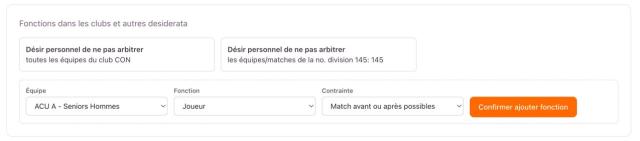
Am FLBB Extranet kanns du net nëmmen deng allgemeng Disponibilitéiten an deng Absencë verwalten, mee och Funktiounen an engem Veräin uginn, fir d’Nominatiounen besser un deng Situatioun unzepassen.
ℹ️ Dës Rubrik ass nëtzlech, wann s du selwer an engem Veräin aktiv bass an d’Nominatiounen dorop solle Récksiicht huelen.
An der Rubrik „Fonctions dans les clubs et autres desiderata“ kanns du festleeën:
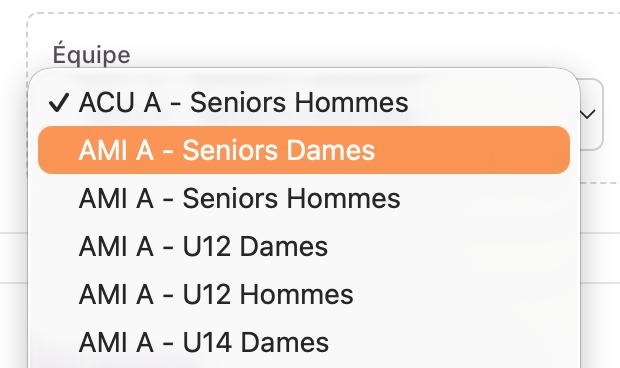
- Équipe: déi concernéiert Ekipp
- Fonction: zum Beispill Joueur, Coach oder Officiel/autre
- Contrainte: wéi deng Disponibilitéit ronderëm dës Ekipp gereegelt soll ginn
Du kanns dono eng passend Contrainte auswielen, wéi zum Beispill:
- Match avant ou après possibles
- Pas de match avant
- Pas de match après
- Pas de match le jour du match
Wann alles richteg ausgewielt ass, klicks du op „Confirmer ajouter fonction“, fir deng Informatioun ze späicheren.


🇬🇧 English
✈️ Manage your availability
You are responsible for keeping your availability and absences up to date on the FLBB Extranet. This allows appointments to be made using accurate information.
🔐 Login
- 🌐 Go to the FLBB Extranet 🔗.
- 👤 Click “Login.”
- ✍️ Enter your email address or your last name and first name.
- 🚫 Do NOT enter a club and don’t tick the box net to Bascol!
- 🔑 Enter your password.
- ✅ Click “Se connecter.”
ℹ️ The new FLBB Extranet replaces the former clubs.flbb.lu and interactif.flbb.lu websites.
🏀 Referee menu
Once you have logged in:
- Find “Menu des Arbitres” in the main menu.
- Click it to open the referee functions.
- Select “Vos disponibilités.”
This section allows you to view and update your general availability and absences.

⏳ Important deadlines
- 📅 Absences can only be changed in the system up to 10 days before appointments are issued.
- 📧 Any unavailability after this deadline must be communicated directly by email to Patrick or Alain.
- 📞 An absence reported less than 48 hours before the game must be communicated by telephone.
❗ Check your availability regularly and enter your absences as early as possible. Once you have been appointed, you are expected to officiate the game.
✅ General availability
At the top of the “Vos disponibilités” page, you can select:
- 🔢 How many appointments you accept per weekend
- 🏀 The types of games you wish to officiate, such as Bascol, Lasel, Luxrollers or 3×3
- 📆 The days on which you are available
💾 Make sure you click “Confirmer changement” to save your choices.
🚫 Adding an absence
You can manage your absences at the bottom of the “Vos disponibilités” page.
To add a new absence:
- 📅 Select the relevant dates in the final box.
- ➕ Check that all the dates are correct.
- 💾 Make sure you click “Confirmer ajout absence.”
⚠️ Selecting the dates alone is not sufficient. Your absence is saved only after you click “Confirmer ajout absence.”
🏀 Club functions and other desiderata
In the FLBB Extranet, you can manage not only your general availability and absences, but also declare functions within a club so that appointments can better reflect your situation.
ℹ️ This section is useful if you are active within a club yourself and want appointments to take that into account.
In the section “Fonctions dans les clubs et autres desiderata,” you can specify:
- Équipe: the relevant team
- Fonction: for example Joueur, Coach or Officiel/autre
- Contrainte: how your availability should be handled in relation to that team
You can then choose the appropriate constraint, such as:
- Match avant ou après possibles
- Pas de match avant
- Pas de match après
- Pas de match le jour du match
Once everything is selected, click “Confirmer ajouter fonction” to save it.


